My latest piece:
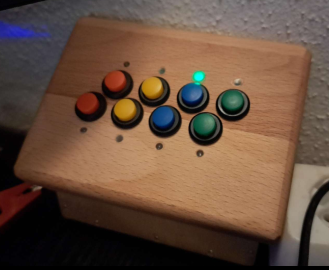
A control panel with eight independent buttons, each with an RGB LED, in a solid beechwood front panel.
Integrated into home automation via Wi-Fi and MQTT/s. I can assign any function to any button, which I can then control within my home automation system.
I even built a small router table into my worktop specifically for machining the front panel😉
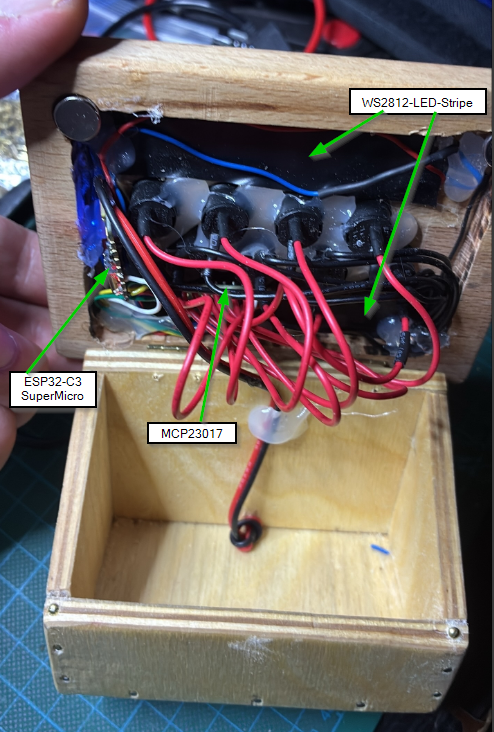
The LEDs are two WS2812 strips, which you can buy by the meter. I drilled and milled corresponding holes in the front panel, filled them with hot glue, and then glued the LED strips (two pieces, each with four LEDs) to the back. The hot glue also acts as a light guide. The material is quite opaque, which naturally weakens the LED light initially (a disadvantage) – but the LEDs are bright enough, almost to the point of being blinding!😉 However, diffusion is actually an advantage, especially with mixed colors. In the end, it works better than I had hoped. 🙂
Only the prism effect from the ashtray bottoms in front of my eyes is annoying 🤓 - when I look at a purple RGB LED through my glasses from the corner of my eye, I can clearly see a red and a blue LED separated from each other..
But the hot glue can't help that either😉
The buttons are soldered to an MCP23017 chip, a 16-channel I/O chip with an I²C bus – so I could expand the console to up to 16 buttons using the same electronics. Because each button is individually connected to the chip, all eight buttons are completely independent. I can even press multiple buttons simultaneously – it still works exactly as expected.
The LEDs, well, they're WS2812s – standard for me now. Up to 1023 individually addressable RGB LEDs on a single control line – the simplest possible wiring for many individually addressable LEDs that can shine in all possible colors (except black, of course – black doesn't light up). Especially since different configurations are possible (e.g., an LED strip, then an 8-LED module, then a ring with 60 LEDs, and then a handful of individual LEDs) – in the end, each LED gets an address starting from 0, ascending in the order in which they are connected to the single data line.
I soldered the whole thing to an ESP32-C3 SuperMicro (probably the smallest ESP32 on a breakout board), using a self-compiled Tasmota firmware (individual buttons on an MCP23017 are unfortunately not included in the default Tasmota images that can be downloaded).
Tasmota offers events for buttons beyond the normal, single press, including long presses, double-clicks, and even five-clicks. Theoretically, I can trigger up to 48 different events with the eight buttons (96 different events would be possible with 16 buttons). Currently, only four buttons are assigned a single click: they control the four sockets of a Shelly four-way power strip. While the power strip has a button for each socket, this isn't very practical if you want to hide the strip under your desk – hence the control panel. I could easily have the LEDs on the control panel light up in different colors, depending on the current draw of the connected socket. But the color changes would just get annoying – a simple green light for "on" is perfectly sufficient for me.
Power consumption of the control panel as shown in the picture: 200 mW (0.2 watts). The LED is set to a relatively dim setting, and only one is lit. When all eight are illuminated in white at full brightness, the power consumption jumps to a whopping 1.65 watts.
It's kind of perverse, considering that 200 mW with a relatively dim LED also includes the 16-port I/O chip and the entire ESP32 with active Wi-Fi – they all need power, too. Add a couple of status LEDs, and bam – eight times the power consumption... Yes, I know – it's a first-world problem, and I have a solar power system, so I get the electricity so cheaply... (no, my solar power system is not from Enpal! 😛 ) 😉
That's how I spent the last three weekends (with the router table). And it was relaxing for me – culminating in the control panel test: all eight buttons work, all eight LEDs light up.🌞
That's how I spent the last three weekends (including the milling table). Three precious weekends so I don't have to bend down under my desk anymore to switch on the soldering iron and the lab power supply. I only need both of them anyway to keep tinkering with these "toys." "Lazy, lazier, IT guy" or just "freak" - take your pick. I'll still be proud of it! And it was relaxing for me - culminating in the control panel test: all eight buttons work, all eight LEDs light up.😀
Interior: